









What to Do When Your Thermostat Is Not Responding to AC Settings
If your thermostat is not responding to AC settings, here are the most common fixes to try first:
- Replace the batteries - Dead batteries cause roughly 50% of thermostat failures
- Check your circuit breaker - A tripped breaker cuts power to the entire system
- Verify the mode - Make sure it's set to COOL, not HEAT or OFF
- Set the temperature correctly - The target temp must be lower than the current room temperature
- Replace a clogged air filter - Restricted airflow can trip a safety shutoff that mimics a thermostat problem
- Inspect wiring connections - Loose or corroded wires break communication between the thermostat and AC
- Wait out the compressor delay - Modern systems have a 5-minute restart delay built in
It's one of the most frustrating things a San Gabriel Valley homeowner can face: you walk over to the thermostat, crank down the temperature, and... nothing happens. The AC sits silent while the house keeps warming up.
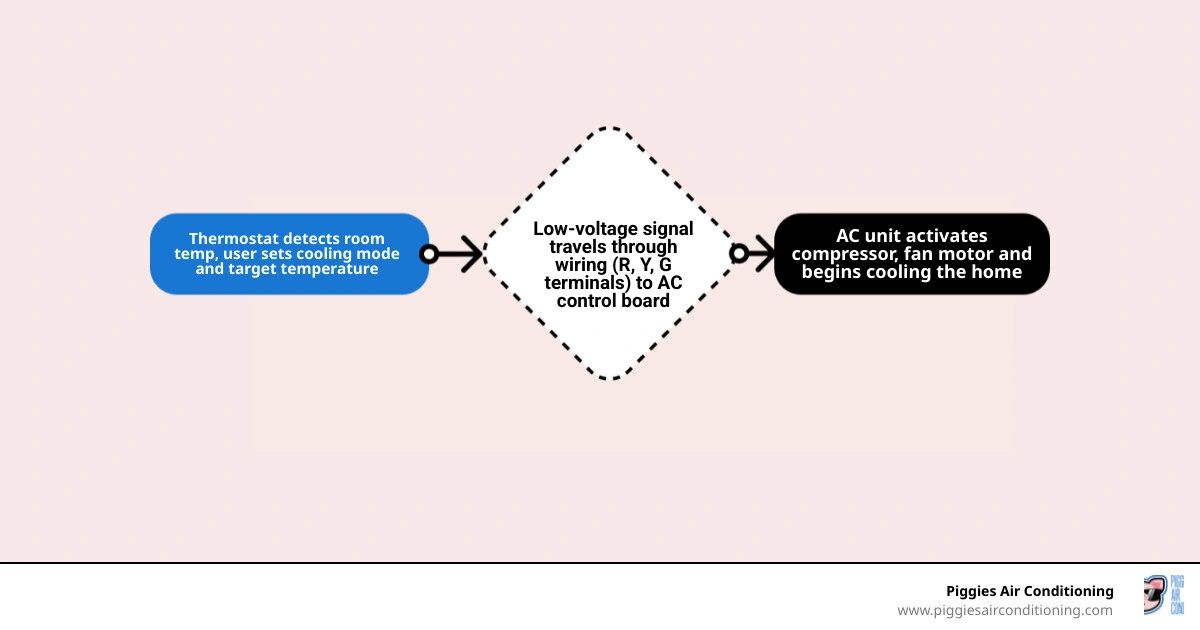
Your thermostat is essentially the brain of your AC system. It reads the temperature, decides when cooling is needed, and sends a low-voltage signal to start the whole process. When that communication breaks down — whether from dead batteries, a wiring fault, or a deeper equipment issue — your home stops cooling, and your energy bills can quietly climb.
According to industry data, thermostat-related issues account for roughly 30% of all "AC not cooling" service calls. That's a significant number, and the good news is that many of these problems are fixable without a professional visit. This guide from Piggies Air Conditioning walks you through exactly how to diagnose and resolve the issue, step by step.
Learn more about thermostat not responding to ac settings:
- ac troubleshooting before calling a pro
- why is my ac blowing warm air
- circuit breaker keeps tripping when ac turns on
Common Reasons Your Thermostat is Not Responding to AC Settings
When your air conditioner ignores your thermostat settings, the breakdown can happen at several points along the line. Let's break down the most common culprits behind this communication failure.
Dead or Weak Batteries
Even if your digital screen is still dimly lit, weak batteries might not have enough power to send the actual 24V signal to your cooling system. Many homeowners assume that if they can see the temperature on the screen, the batteries are fine. In reality, sending a signal to your outdoor unit requires more voltage than simply running the low-power LCD screen.
Tripped Circuit Breaker
Your indoor air handler and your outdoor condenser run on high-voltage circuits, while your thermostat runs on low-voltage power supplied by a transformer in your indoor unit. If the circuit breaker for your furnace or air handler trips, your thermostat loses its source of 24V power. To understand how electrical interruptions impact your system, take a look at What to Check AC System Fails to Power Up.
Clogged Air Filter
It might seem unrelated, but a dirty air filter can completely disable your cooling system. When airflow is severely restricted, the evaporator coil inside your home can freeze, or the system can overheat. This triggers a safety limit switch, shutting down the AC to prevent permanent compressor damage. If this happens, your thermostat will appear to be working, but the system will ignore any cooling calls. Check out our comprehensive guide on AC Troubleshooting Before Calling a Pro to learn more about managing airflow issues.
Float Switch Activation and Condensate Overflow
In humid environments, your air conditioner pulls a massive amount of moisture out of the air. This water drains into a condensate pan and flows outside. If the drain line gets clogged with algae or dust, the water backs up. Modern HVAC systems are equipped with a safety float switch in the drain pan. When water rises too high, the float switch trips and instantly cuts power to the low-voltage control circuit. This protects your home from water damage but leaves your thermostat completely unable to turn on the AC.
Incorrect Mode Settings
Sometimes the simplest issues trip us up. Ensure that your thermostat has not accidentally been switched to "HEAT," "FAN ONLY," or "OFF." Additionally, check if a family member has enabled an "Eco," "Away," or program override mode that is preventing the system from cooling down to your desired temperature.
How to Tell If the Issue is the Thermostat, the Wiring, or the AC Unit
Isolating the problem is the most important part of troubleshooting. You need to determine if you are dealing with a faulty thermostat, a broken wire, or an issue with the air conditioner itself.

Thermostat vs. AC Unit Symptoms
If your thermostat clicks when you lower the temperature, it means the internal relay is attempting to close the circuit to call for cooling. If you hear that physical click but nothing happens, the issue is often downstream — such as a blown control board fuse, a bad capacitor, or a tripped safety switch. If you hear a click from your outdoor unit but the system fails to start, read about the AC Making Clicking Noise When Starting Up to help pinpoint the electrical failure.
On the other hand, if you adjust the settings and the thermostat remains completely silent, makes no clicking sound, or shows erratic temperatures, the thermostat itself or its power source is likely at fault. If the indoor fan runs but the air coming out of your vents is warm, you might be dealing with a compressor issue or a refrigerant leak. You can read our guide on How to Check if AC Refrigerant is Low to see if a system charge issue is the true source of your warm air.
Low-Voltage Wiring and the Control Board
Your thermostat connects to your indoor unit's control board via a bundle of thin, low-voltage wires. These wires operate on a 24V AC standard. If a wire is pinched, chewed by pests, or pulled loose from its terminal screw, the signals will never reach their destination.
Diagnosing a Thermostat Not Responding to AC Settings via the Bypass Test
The definitive way to find out if your thermostat is broken is to perform a bypass test. This test bypasses the thermostat entirely and manually connects the cooling wires. If the AC turns on during the bypass, your thermostat is bad. If the AC still won't turn on, the problem lies in your wiring, control board, or outdoor unit.
Warning: This test involves low-voltage (24V AC) wiring, which is generally safe to handle, but you must exercise caution. If you are uncomfortable handling wires, please call our team at Piggies Air Conditioning.
To perform a safe bypass test:
- Turn off power to your HVAC system at the main circuit breaker.
- Remove the thermostat faceplate from the wall to expose the wiring terminals.
- Identify the wires. You should see a red wire connected to the R (or Rc) terminal, a yellow wire connected to the Y terminal, and a green wire connected to the G terminal.
- Disconnect the R and Y wires from their terminals.
- Join the R and Y wires together temporarily using a small jumper wire or by gently twisting their bare copper ends together (avoid touching other metal surfaces).
- Turn the circuit breaker back on.
- Observe the system. If your outdoor compressor and indoor fan turn on immediately, your thermostat is faulty and needs to be replaced. If nothing happens, turn the breaker back off, separate the wires, and look for an issue with your control board, transformer, or wiring.
Identifying Bad Relays and Wiring Issues When the Thermostat is Not Responding to AC Settings
Inside your thermostat is a tiny mechanical or electronic relay. When the thermostat senses that your home is too warm, this relay closes, connecting the 24V power from the R terminal to the Y terminal (which controls the compressor) and the G terminal (which controls the indoor fan).
Over time, these internal relays can wear out or burn. If the relay fails, the thermostat might show "Cool On" on its screen, but it won't actually pass the 24V current to the wires.
You should also look for:
- Corroded Wires: In older homes, or if your thermostat is mounted on an exterior wall with moisture exposure, the copper wire ends can oxidize and lose connectivity.
- Loose Terminal Screws: Vibrations in the wall or loose installations can cause the terminal screws holding the wires to back out.
- Transformer Failure: If your indoor unit's transformer fails, it won't convert your home's 120V power down to the 24V power your control system needs. This leaves the thermostat completely powerless.
- Continuous Running: Sometimes, a short circuit in your thermostat wiring can cause the system to run nonstop, ignoring your settings entirely. If your system won't shut off, read more about AC Running Constantly What It Means.
Step-by-Step DIY Troubleshooting Guide
Before you pick up the phone to call a technician, use this structured troubleshooting flow to rule out simple, free fixes.
| Feature / Step | Traditional Programmable Thermostat | Smart / Wi-Fi Thermostat |
|---|---|---|
| Primary Power Source | AA or AAA Alkaline Batteries | C-Wire (Common Wire) or Rechargeable Lithium Pack |
| Common Failure Point | Corroded battery contacts, dust buildup | Wi-Fi disconnect, firmware glitches, lack of C-wire power |
| How to Reset | Remove batteries for 60 seconds | Perform a system reset through the digital settings menu |
| Cleaning Method | Soft brush, compressed air on mechanical contacts | Wipe screen with dry microfiber cloth, check backplate pins |
1. Perform a Battery Replacement
If you have a traditional programmable thermostat, pop off the faceplate and replace the batteries with fresh, high-quality alkaline batteries. Do not use rechargeable batteries, as they often output slightly lower voltage than standard alkaline cells.
2. Clean the Thermostat Interior
Dust, pet hair, and residue from household sprays can coat the sensors and mechanical contacts inside older thermostats. Remove the cover and gently blow away dust using canned compressed air. You can also use a soft-bristled brush to clean the contacts.
3. Calibrate Your Temperature Sensor
If your AC runs but your home feels much warmer or cooler than the thermostat setting, the sensor may have drifted out of calibration. Place a highly accurate digital thermometer right next to your wall thermostat. Let it sit for 15 minutes. If the readings differ by more than 2 to 3 degrees, your thermostat needs to be recalibrated (refer to your manual for calibration settings) or replaced.
4. Reset the Circuit Breakers
Locate your main electrical panel. Find the breakers labeled "AC," "Air Handler," "Furnace," or "HVAC." Even if a breaker doesn't look tripped, flip it completely to the OFF position, wait 10 seconds, and then flip it firmly back to ON.
5. Update Smart Thermostat Firmware
If you use a smart thermostat, check your smartphone app to see if the device is offline. A smart thermostat that loses its Wi-Fi connection can fail to execute its programmed schedule. Ensure its firmware is updated to the latest version to patch any communication bugs.
6. Reset Keypad and Settings Locks
Some thermostats have a keypad lock feature to prevent accidental adjustments. If your screen is on but won't respond to your touch, look for a padlock icon. Unlocking usually requires holding down a specific combination of buttons (such as the up and down arrows simultaneously) for several seconds.
When to Replace Your Thermostat vs. Calling a Professional
How do you know when a simple thermostat swap will solve your problem, or if you need a professional technician to inspect your air conditioning system?
Most traditional thermostats have a lifespan of about 10 to 15 years. Over time, the internal temperature sensors drift, the electronic relays degrade, and the physical buttons can stop responding. If your thermostat is over a decade old, replacing it is almost always more cost-effective than trying to repair it. Upgrading to a modern smart thermostat can also reduce your annual cooling costs.
However, if you perform the bypass test described above and your AC still refuses to turn on, the issue is not your thermostat. In this case, you are likely dealing with a failed compressor capacitor, a bad contactor, a burned-out fan motor, or an electrical short circuit on your indoor control board. These issues require professional diagnostics and specialized tools to repair safely.
If you are trying to decide whether to invest in fixing your current setup or upgrading your entire comfort system, check out our AC Repair vs Replace Decision Guide and review the clear Signs That You Need a New AC System. When you need reliable, fast help to get your home cool again, our certified technicians are ready to assist with professional AC Repair Pasadena CA.
Frequently Asked Questions about Unresponsive Thermostats
Why is my digital thermostat screen completely blank?
A blank screen almost always means a total loss of power. Start by replacing the batteries. If that doesn't work, check your home's main electrical panel for a tripped circuit breaker. If the breaker is fine, the issue could be a blown low-voltage fuse on your indoor air handler's control board, a tripped float switch caused by a clogged condensate drain, or a failed 24V transformer.
Can a dirty air filter cause my thermostat to stop working?
A dirty air filter won't damage the thermostat itself, but it can cause your AC system to shut down completely. When airflow is blocked, your system can overheat or freeze its evaporator coils. This trips built-in safety limit switches, cutting off power to the low-voltage control circuit. When this happens, your thermostat may lose power or fail to activate the AC, making it look like the thermostat is broken when the filter is actually the root cause.
How often should I replace my thermostat batteries?
We highly recommend replacing your thermostat batteries once a year. A great habit is to change them at the start of the cooling season. Always use high-quality, non-rechargeable alkaline batteries. Replacing them proactively prevents unexpected system shutdowns and keeps your AC running reliably through the hottest summer months.
Conclusion
A thermostat not responding to ac settings can quickly turn your comfortable home into an unbearable sauna. By systematically checking your batteries, circuit breakers, air filters, and wiring, you can often pinpoint and resolve the issue yourself.
When DIY troubleshooting isn't enough, or if your bypass test indicates a deeper electrical issue, our experienced team at Piggies Air Conditioning is here to help. Serving Baldwin Park, West Covina, Pasadena, and communities throughout the San Gabriel Valley and eastern Los Angeles County, we provide fast, honest, and expert service.
As a certified Daikin Comfort Pro dealer, we stand behind our work with an industry-leading 12-year full replacement and labor warranty on qualifying Daikin systems. Whether you need a quick thermostat replacement, a smart upgrade, or a complete system repair, we have you covered.
Contact us today to schedule your service:
- Book expert AC Service Pasadena
- Schedule professional HVAC Service Pasadena CA
- Explore all of our Piggies Air Conditioning Air Conditioning Services
Other blogs


Customer Testimonials



CUSTOMER SERVICE!
I highly recommend this company for anyone needing AC repair or maintenance. I'll definitely be calling them again for any future needs!

I had the pleasure of experiencing outstanding service and professionalism from Ruben, and I am beyond impressed. From the moment I first contacted them, by phone and follow up communication via email for my quotes. The attention to detail and commitment to excellence were evident.
Ruben, was incredibly responsive, addressing all my inquiries promptly and with clear, thorough explanations. Their dedication to understanding and meeting my needs was remarkable.
Ruben, went above and beyond to ensure that everything was handled seamlessly, demonstrating not just professionalism, but also a sincere dedication to customer satisfaction.
I can't recommend Piggies air Conditioning/Ruben highly enough. If you're looking for someone who combines expertise with exceptional service, look no further. They are a true example of what outstanding professionalism should be.
The technician arrived on time, which I really appreciated given how crucial air conditioning is in this heat. Ruben was professional and friendly, explaining what he was doing throughout the process. The issue I had was diagnosed fairly quickly, and they provided me with a few options on how to fix it. The pricing was transparent, and I didn't feel like there were any hidden costs, which is always a plus when it comes to service calls like these. Highly recommend this company!
1st & foremost, huge shout out to Ruben thank u so so much for reaching out & making things happen SO FAST! I was so surprised since i had reached out to a couple different places who lagged on even answering calls, messages, etc.
Ruben was also very informative & taught me ALOT that i didnt know about.
Also cant leave the amazing Luis & Miles out of
this review.
They came, they saw, they conquered!
And they worked pretty swiftly too, felt very comfy around em, loved their personalities, great attitude, work ethic, professionalism, had some really good convos & they still got the job done lightning fast
SUPER HUGE SHOUT OUT & THANKS for everything guys! Definitely recommending u guys to everyone i know.
recommendations and feedback. The actual installation was painless and unremarkable, his AC experts got it done, got it cleaned and most importantly got it right. Rueben even went a step further to assure we had
protection from the coming rain, that is service unheard of these days. His price was competitive and a REAL value for the service we recieved. Using anyone else for your AC needs, would be a huge mistake. We thank them again and will recommend to everyone.
Echoing a lot of the other reviews here, Piggies Air Conditioning responds so quickly to requests (even though I actually accidentally sent in multiple requests on my side without responding, oops!)
They were able to come do a FREE energy audit and initial inspection on the same day and Ruben was amazing at explaining his thoughts on our house's situation and what he thought was worth the money and wasn't worth the money.
I truly felt like he was trying to help me find the best solution to our issues instead of just trying to upsell us on everything and anything.
I'm definitely recommending this business to anyone I know if they want a trustworthy and realistic service, value, and quality.